

After you installed the modem hardware and its driver, you can check your modem installation by the following steps:
1). Click on the
Windows Start button, then select Control Panel.
2). Click on the Phone and Modem Options, then select the Modem
tab.
3). If you have installed the Voicent 3025 or Zoom 3025c, you should see
Zoom V.92 PCI Voice Faxmodem listed. Voicent modem shares the same
driver as Zoom modems.
4). Click the Properties button, then select the Driver Tab.
5). The driver provider should be Zoom Telephonics, Inc
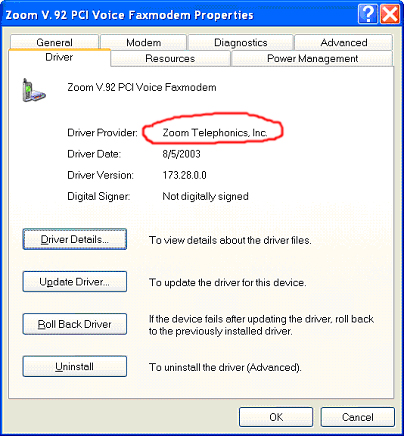
If in step 5 the driver provider is Microsoft, then your driver installation is not correct. The default Microsoft driver does not support voice. Please click Update Driver button to install the correct modem driver.
First try to see whether your modem is firmly pushed into the PCI slot.
Use a different PCI slot.
Use a different computer.