9.6 Use Database Action
There is actually no need to write a Java program just for database access. IVR Studio provides a native database action for executing any SQL statement. To demonstrate the action, we use the same sample of this lesson, but add the following: once a caller is authenticated, the application will update the database table and remember the access time.
Update the Database
Table
Add a new column named Last_Login, and set the column type to datetime.
| Account_Id |
Account_Password |
Last_Login |
| 101 |
123 |
|
| 102 |
3456 |
|
Update the Action
There is no need to update the call flow, except we need to change the Java action of the Check Password element to a Database action as follows:
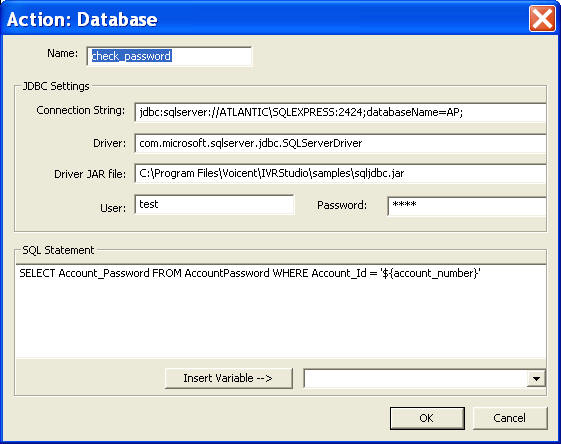
This action provides all the functions implemented by the Java program shown in previous sections. It will load the database driver, connect to the database, execute the SQL statement, and then set the return to the action variable.
Create a new action to update the database
Select the element labeled Protected Info, and add the following action.
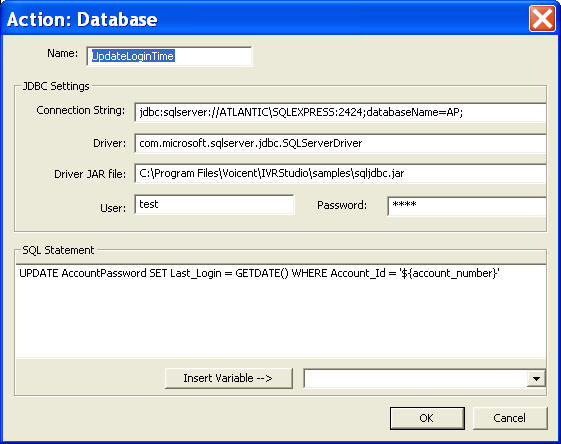
This action updates the user account and set the Last_Login column to the current date and time.
Use SELECT statement
For database SELECT statement, DB action returns the whole result set in multiple name value pairs. Use the dot notation to access a particular result. The format of the dot notation is: action_variable.colume_name.row_index, where row_index starts from 1. For example, if you executed "SELECT * from AccountPassword" of db action "select_ids", you can access the account_id using: select_ids.Account_Id.1 and select_ids.Account_Id.2.
The total number of rows is also set in the action return variable. Use the dot notation .rows to access it, such as select_ids.rows.
|