

Voicent Communications Logo autodialer auto phone dialer software auto dialers
Big Business Benefits. Small Business Price
smart autodialer software auto dialer software and auto phone dialer. autodialers
autodialers phone dialer systems automatic dialer automatic dialers
 
Support
Frequently Asked Questions
 
  AutoReminder User Manuals
  BroadcastByPhone User Manuals
Product Walkthrough
 
  BroadcastByEmail
software free download Download
Try our shareware version before you buy.

Download
 
Developers

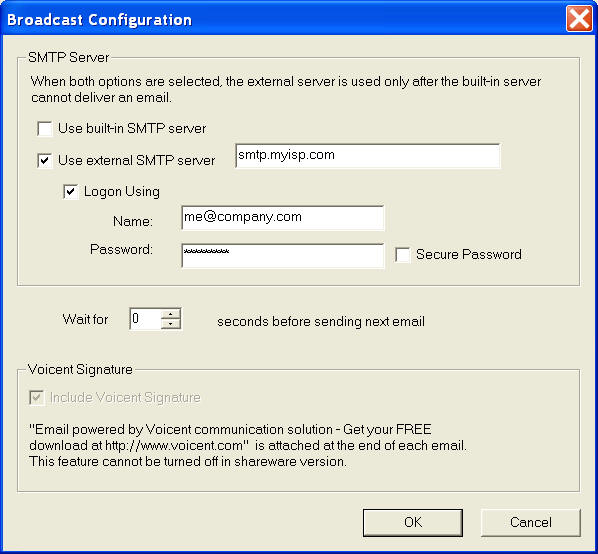
How to set up SMTP server for BroadcastByEmail

There is a built-in SMTP server in BroadcastByEmail. You can use it to send outgoing emails.

Sometimes, it is better to use an external email server for broadcasting your emails. For example, you are using a DSL connection from home and your ISP requires or recommends you to use its SMTP server.

The following dialog can be invoked from Broadcast > Configuration....

Each ISP's SMTP (outgoing email) server is different. You should get the server information from your system administrator or ISP's website.

If you are using Microsoft Outlook and your email is working, you can also get this information from your Outlook configuration. Select Tools > Email Accounts... from the program main menu, and then select the email account your are using.


  Autodialer | Appointment Reminder | Phone software | Wakeup Calls | Auto dialer | Telephone notification | STORE
 © 2003, 2004, 2005 Voicent Communications, Inc.