How to Use Appointment Reminder Software
Appointment Reminder
Auto Reminder
Learn More
Why should I use it?
Automated appointment reminders are more reliable because there is less chance of human error. Also, automation frees your staff of hours spent tracking appointments, dialing phones, waiting for answers, and leaving messages. Those hours can now be spent doing more important work.
Can appointments be confirmed using AutoReminder?
Yes, when a live person answers, they can press a key to automatically confirm their appointment. They can also press another key to cancel or to speak to a receptionist in your office.
Can the system be used as an appointment scheduler?
Yes, AutoReminder appointment reminder software includes an intuitive calendar for appointment setting and re-scheduling. No extra steps are needed to schedule a reminder call when you schedule an appointment. The software will automatically schedule the reminder call.
Can I personalize messages?
Yes, AutoReminder software includes a Message Designer for message personalization. For example, with Text to Speech, the autodialer can play "Hi Bob, ..." for Bob and "Hi Mary, ..." for Mary, making your call more personal and more effective.
Contact Us
Free Trial
If you are using another scheduling software or office management software to make appointments, you can export the appointments in a comma separated file, then have Voicent AutoReminder import the file and make reminder calls. The import file format is specified below:
Contact, Phone, Start Time, End Time, Call Time, MessageID, Notes, Include Notes, Category, Confirmation, User, Audio File, Room, SMS Number, SMS Send Time, SMS Message ID, SMS Include Notes, Email Address, Email Send Time, Email MessageID, Email Include Notes
The First three fields are required fields. Each appointment is specified in a single line. The first line is ignored and can be used for table headings. The following is a sample line:
"John K", "123-3456", "11/02/2003 10:00 am", "", "11/01/2003 10:00 am"
Please note that the first line is ignored if importing from a file. The first line is usually a header row.
Some scheduling program can only export/print a fixed format. That format might not be recognized by Voicent AutoReminder. In this situation, a conversion program is needed.
Please contact our service organization if you need such a conversion program.
Details Of Import Fields
|
Corresponding Appointment Fields
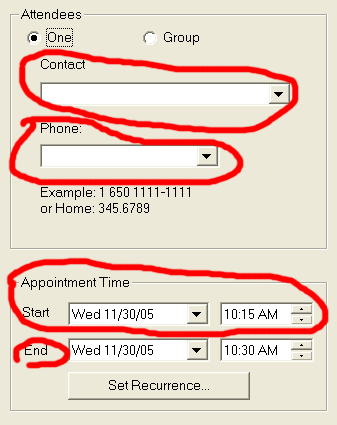
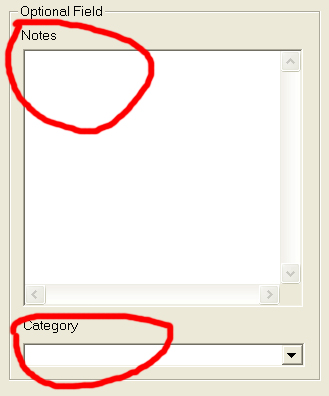
These fields correspond to the fields in the Create Appointment Dialog as shown below: