
How to Use Appointment Reminder Software
Appointment Reminder
Auto Reminder
Learn More
Why should I use it?
Automated appointment reminders are more reliable because there is less chance of human error. Also, automation frees your staff of hours spent tracking appointments, dialing phones, waiting for answers, and leaving messages. Those hours can now be spent doing more important work.
Can appointments be confirmed using AutoReminder?
Yes, when a live person answers, they can press a key to automatically confirm their appointment. They can also press another key to cancel or to speak to a receptionist in your office.
Can the system be used as an appointment scheduler?
Yes, AutoReminder appointment reminder software includes an intuitive calendar for appointment setting and re-scheduling. No extra steps are needed to schedule a reminder call when you schedule an appointment. The software will automatically schedule the reminder call.
Can I personalize messages?
Yes, AutoReminder software includes a Message Designer for message personalization. For example, with Text to Speech, the autodialer can play "Hi Bob, ..." for Bob and "Hi Mary, ..." for Mary, making your call more personal and more effective.
Contact Us
Free Trial
Using Voicent AutoReminder, you can set up appointment reminders for yourself, others, or a group.
Invoke the New Appointment Dialog by double clicking on the calendar area, the icon on the toolbar, or the New Appointment menu item from the main menu..
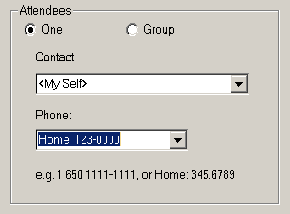
You can choose <My Self>, select a contact from the drop down list, or type in the name. Select or type in the phone number. (The system remembers everything you typed in, so you can easily select them next time).
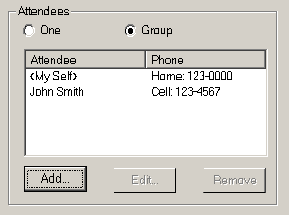
Select Group if there are multiple attendees. Select Add to add new attendee.
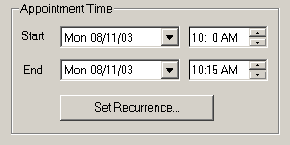
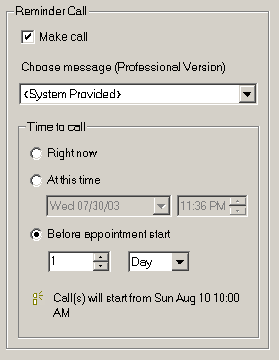
See Customize messages if you want to use your own reminder messages.
There are 3 ways to set the reminder call time. "Right Now" means call immediately after you click the Finish button. "At this time" means you choose the exact time to call. And "Before appointment start" means call before the appointment start time, such as 1 Day or 2 hours before the appointment.
See Include Text Using Text-to-Speech if you want to have appointment notes read to you by computer.
Click Finish to add the appointment and reminder call.
