

Starting From: $288
Upcoming Webinars

Advantages of Voicent's
BroadcastByPhoneAuto Dialer
- One time purchase, use forever
- No monthly fee, no contract
- Instant Download
- Works on any PC
- Works with VOIP, PBX, phone line
- Easy to use
- You can try it before you buy it
The telephone audio format

Get Rid Of Initial Silence
How to check Federal Do-Not-Call List
Follow these instructions to check your call list against the Federal Do-Not-Call List. Please note that the instructions described here apply to both Voicent BroadcastByPhone program and Agent Dialer program.
Download your Do Not Call Lists from http://www.donotcall.gov. When downloading, please select the Text Format.
Once downloaded, use winzip program to unzip the file and save the file to a directory, such as c:\donotcall
For your call list, once it is loaded in the program, do the following:
In the main menu, select the Broadcast, and then Check Do-Not-Call List
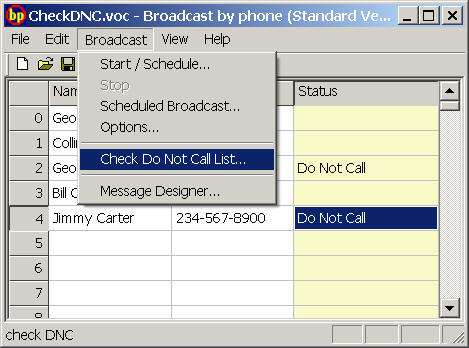
Specify the directory that contains do not call files (for example, c:\donotcall)
Specify the local area code, click OK.
For phone numbers in the Do not call list, the status column will be set to Do not call. Please save your call list. Future broadcast will skip the row with Do not call set.