

Starting From: $288
Upcoming Webinars

Advantages of Voicent's
BroadcastByPhoneAuto Dialer
- One time purchase, use forever
- No monthly fee, no contract
- Instant Download
- Works on any PC
- Works with VOIP, PBX, phone line
- Easy to use
- You can try it before you buy it
The telephone audio format
Get Rid Of Initial Silence
Manage Dialer Call List
The list management features include the following:
- Sort list by name, phone number, or call status
- Clean list by removing rows with duplicate numbers, or failed call status
- Exclude list by running against an exclusion file
- Generate call list by a given telephone prefix
To access the list management feature, simply select the List menu from your program main menu.
Sort Call List
Select List > Sort... from the main menu, you should get this window
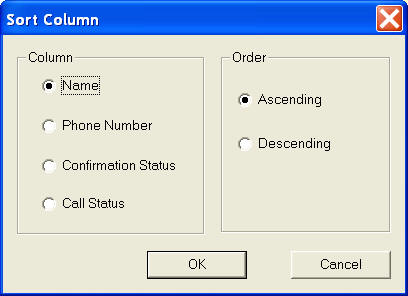
This feature is useful in multiple ways. For example, if you want to call everyone on your call list that your previous broadcasting failed to reach, you can sort your broadcast file according to the call status, select all the rows with the failed status column, and then press the Delete key. Save the call list file and start another broadcast. The program should only call the phone numbers in the rows without status.
Clean Call List
You can clean up your call list by removing rows with duplicate phone numbers, failed call status, or empty phone numbers. Just select List > Clean... from the main menu.
Phone list exclusion
You can run an exclusion check against a phone list file. Select List > Exclude List... from the program main menu. In the popup window, select the exclusion file by clicking the browse button. Click OK. The program removes any row with its phone number appears in the exclusion file. The exclusion file should contain a list of telephone numbers. Each number should be in a separate line.
For example, your call list file could look like this:
8051234567
8052223345
9013334567
......
Generate Call List
You can generate a call list from a given prefix, such as an area code. Select List > Generate List... from the program main window. You should see the following dialog.
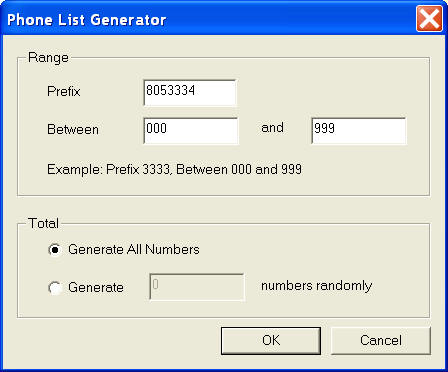
The generated list is based on the prefix and range specified in the dialog window. For example, if you want to generate all number in the format of (805)333-4****, you can specify "8053334" as prefix, and "000" and "999" as the range. The program will generate a call list as:
805 333 4000
805 333 4001
805 333 4002
......
805 333 4999
These numbers will be automatically appended to the existing broadcasting file. by specifying all extensions of your company, you can use this feature to call everyone to deliver your message.
How to Customer Auto Dialer Message