Voicent Communications Logo autodialer auto phone dialer software auto dialers
Big Business Benefits. Small Business Price
smart autodialer software auto dialer software and auto phone dialer. autodialers
autodialers phone dialer systems automatic dialer automatic dialers
 
Support
Frequently Asked Questions
 
Knowledge Base
IVR Knowledge Base
  AutoReminder
  BroadcastByPhone
Product Walkthrough
 
  BroadcastByEmail
software free download Download
Try our shareware version before you buy.

Download
 
Developers

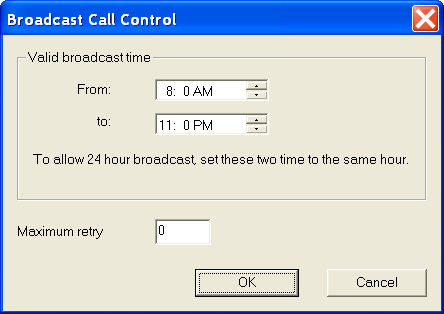
How to set broadcast time

You can specify the broadcast time in order to block outbound calls during certain time of day, such as late in the evening. To set the time, select Broadcast --> Options from the main menu.

An ongoing broadcast will be automatically stopped once it reached the blocked time.

1. "From" time is earlier than "To" time

If From time is earlier than To time, then no calls will be made before From time and after To time.


blocked

From:


Broadcast

To:

blocked


2. "From" time is later than "To" time

If this is the case, the valid broadcast time is from From time till To time the next day.


Broadcast


Next Day
Broadcast


To:


blocked


blocked

From:

Broadcast


Broadcast


3. "From" time is the same as "To" time

No blocked broadcast time.


Predictive Dialer | Autodialer | Appointment Reminder | Appointment phone reminder | IVR | Knowledge Base | Press release | Telephone notification | Emergency Notification
 Voicent Communications, Inc.