Advantages of Voicent's
BroadcastByPhoneAuto Dialer
- One time purchase, use forever
- No monthly fee, no contract
- Easy setup in less than 10 minutes
- Works on any PC
- Works with VOIP, PBX, phone line
- Feature rich and yet easy to use
- You can try it before you buy it
Learn More
What is an Auto Dialer?
An autodialer can automatically dial a list of phone numbers. Sometime it is called robo dialer.
What is a Smart Auto Dialer?
Smart autodialers can automatically dial a list of phone numbers and either play a pre-recorded message or have a computer-generated voice read your message aloud. It can also interact with recipients, allowing them to press a keypad number to confirm the call, leave you a voice message, or even request that the call be transferred to a live person.
How is Voicent's Smart Auto Dialer different?
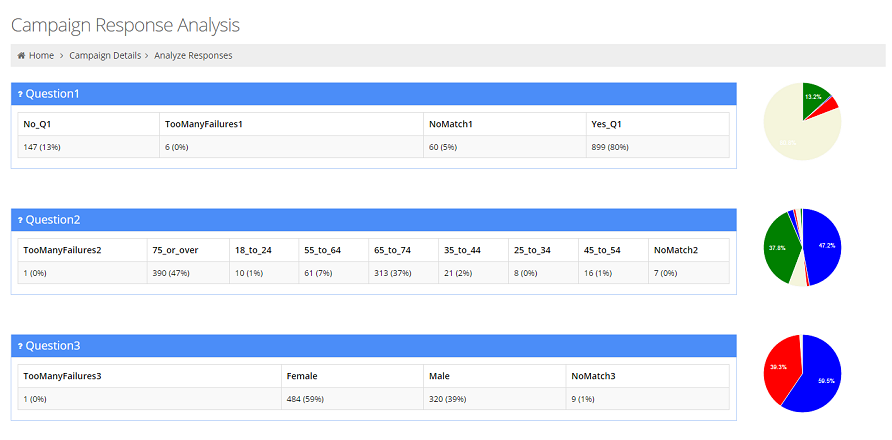
Voicent's autod dialer enables you to execute large volumes of phone messages with the ability to collect individual responses. Because it is software-based, it is affordable and easy to use. It requires no hardware besides your PC and takes only about 10 minutes to download and setup.
What is touch-tone response capability?
Voicent auto dialer can collect touch-tone responses, such as 'press 0 to speak with an agent,' or, 'press 1 to to receive more information,' etc.
How do you personalize messages?
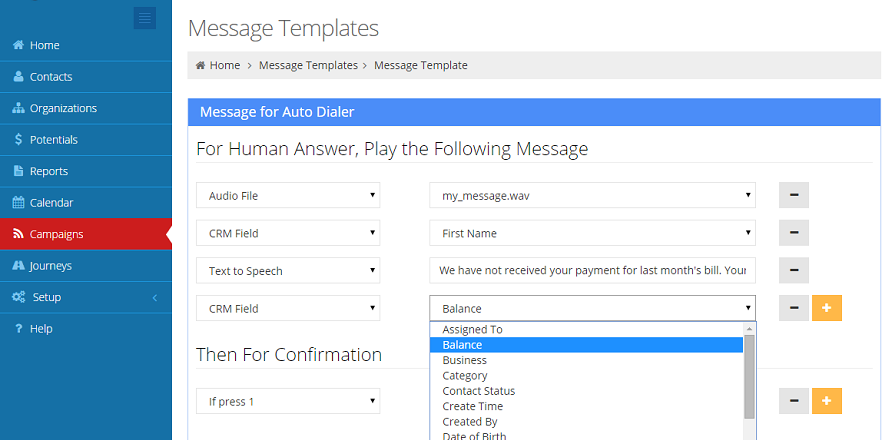
Voicent autodialer software contains a Message Designer for message personalization. For example, with Text to Speech, the autodialer can play "Hi Bob, ..." for Bob and "Hi Mary, ..." for Mary, making your call more personal and more effective.
Overview
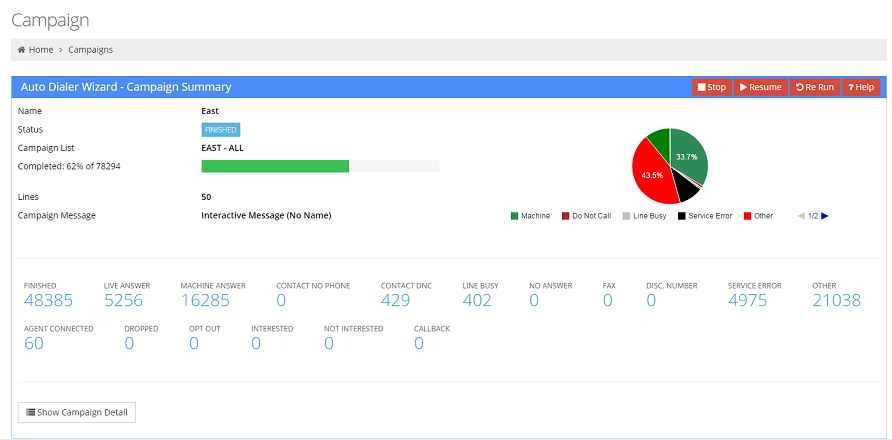
Incredibly affordable, flexible and easy-to-use, Voicent's BroadcastByPhone is an auto-dialer that uses your computer to deliver personal calls or leave answering machine messages in your own voice or a computer-generated voice.
BroadcastByPhone's affordability stems from the fact that you buy it once and own it for life. There are no additional monthly or per-call fees to pay.
Its features include live-call transfer, automated messages, touch-tone opt-out options and an easy-to-use, Excel-like interface.
How does it work?
This Windows-based software uses VOIP technology to make calls through your computer. The calls are delivered either through a VOIP channel, such as SIP or Skype, or through your regular phone lines.
BroadcastByPhone offers an incredibly rich set of features. It is ideal for the communication needs of businesses, faith communities, NGO/nonprofits, political campaigns, schools, or government offices.
To start a broadcast:
Create or import a call list, just as you would create a simple spreadsheet file.
Record a voice message using your computer or telephone, or type in your message and let a computer-generated voice read it aloud for you.
Click to broadcast the message now, or use the built-in calendar to choose the date and time you want the messages sent. That's it!
This auto dialer software is great for
Marketing campaigns
Service pickup or delivery notifications
Phone-trees for schools, libraries, faith communities, clubs, organizations or government offices
Telephone notification of events or sales promotions
Lead generation
Telephone surveys
Debt reminders or notices
Political campaigning
Emergency alert and escalation processes (call until confirm)
Repetitive robo-calls to the same phone numbers
Key Features Of This Auto Dialer Software
Automated dialing with a single click
Incredible scalability--can dial thousands of simultaneous calls from a single, ordinary computer
Live call transfer to any phone (yep, that's right. If your message recipients want to speak to someone right away, they can press a number and get transferred to a live operator or leave a message for you.)
Interactive touch tone response (press 1, press 2, ...) or even voice-activated command and response capabilities
Voice message recording by phone, by computer or by studio
Computer-generated voice (optional); Save/restore call list, import or copy-paste call list
Detects human pick up, answering machine, busy, no answer, disconnected line
Automatic retry for busy line or no answer
Built in calendar for advanced call scheduling
Daily, weekly, monthly, and yearly recurring calls
Call until confirm (for emergency alert escalation)
Automatically schedule call for next day if calls are not finished
Multilingual Text-to-Speech (optional) for customizing each phone call
Check Federal Do Not Call List
Message Designer for auto dialing message personalization (with TTS)
What do I need to use BroadcastByPhone?
A desktop or laptop computer with Windows 2000/2003/XP/2008/Vista/Windows 7 operating system.
A phone service: could be a VOIP/internet phone service, a PBX system with SIP extensions, or a traditional analog phone line (requires voice modem)
Next Step
It's absolutely free to download and try Voicent's BroadcastByPhone auto dialer software. You don't need a credit card or even to supply an email address to try it.
© Copyright 2002 - 2013, Voicent Communications, Inc.