
BroadcastByEmail Software Help
BroadcastByEmail
About BroadcastByEmail
Email Marketing Help
Voicent Advantages
- One time purchase, use forever
- No monthly fee, no contract
- Easy setup in less than 10 minutes
- Works on any PC
- Works with your own email server
- Works with email service like Gmail
- Feature rich and yet easy to use
- You can try it before you buy it
What is opt-In Email Marketing?
Federal anti-spam laws require that marketing emails only be sent to people who have asked for them by subscribing to them or otherwise requesting them.
Customize Email Messages
Bulk email sender sends email that is individualized, including, for example, the recipient's name in the body of the email.
Manage Bounced Emails
Emails sent to incorrect email addresses will be bounced back to you. For large mailing list, that creates a lot of clean-up work! With Voicent BroadcastByEmail software, users can click a button to automatically remove bounced email addresses.
Manage Unsubscribe requests
Helps you easily comply with federal email marketing laws by allowing people to unsubscribe to the email list, and then automatically honoring the requests.
Track Email Open
Know who opened the email and how often. This feature requires a website to work with the broadcast email software.

You must have a web site in order for this to work.
The internet email protocol used everyday does not contain support for open tracking. In order to track email open, a reference to a small 1x1 pixel image is inserted into the email sent. Once the email is opened, and thus the pixel image is accessed, the web site that hosts the image knows the email open.
The pixel image is usually called "pixel tag". It is so small and usually is not visible.
Tracking Opened Emails
Here are the steps:
BroadcastByEmail inserts an unique reference to the pixel tag in each email it sends
The email is opened, and the pixel tag is accessed
The web site hosts the image insert the access count to its database
BroadcastByEmail checks the website database to see which email is opened
Setup Website For Email Tracking
Select Broadcast > Enable Open Tracking... from the program main menu.
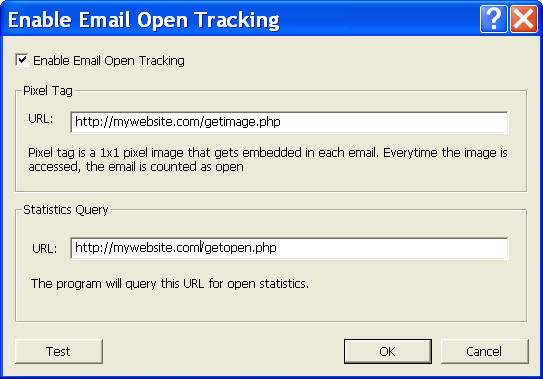
Please replace mywebsite.com to your real web site name.
Pixel Tag URL
This URL is automatically inserted into each email. The inserted line is the following:
<img src="http://mywebsite.com/getimage.php?eid=unique_email_id">
Each email sent by BroadcastByEmail contains a unique id automatically generated for later tracking.
Statistics Query URL
This is the URL used to query email open. BroadcastByEmail calls the following to query the email open.
http://mywebsite.com/getopen.php?eid=list_of_comma_separated_eids
Steps to setup your website and script
The following is an example for setting up your website for email open tracking. It assumes you have a relational database and PHP scripting support.
- Copy or create the pixel tag image to your website
You can use the sample image under: C:\Program Files\Voicent\BroadcastByEmail\bin\onebyoneimage.jpg, or you can use any image editing tool to create your own image.
- Setup your database
You web site must support database. Most hosting companies have mysql database. You basically needs to create a table to contain the eid. But you can also include access time and access host IP address. The following SQL statement creates a table named "opentracking":
CREATE TABLE `opentracking` (
`eid` varchar(64) NOT NULL default '',
`ipaddr` varchar(16) NOT NULL default '',
`atime` timestamp(14) NOT NULL
) TYPE=MyISAM;
- Copy or create the image access script to your
website
For following is a simple example PHP script for the get image operation. You can use it directly if your website supports PHP scripting.
<?php
header("Cache-Control: no-cache, must-revalidate");
header("Expires: Mon, 26 Jul 1997 05:00:00 GMT");
$eid = $_GET['eid'];
$ip = $HTTP_SERVER_VARS['REMOTE_ADDR'];
$db_conn = mysql_connect('hostname', 'user', 'passwd') or die ("Database CONNECT Error (line 11)");
$insert_st = "INSERT INTO opentracking values ('".$eid."', '".$ip."', now())";
mysql_db_query('databasename', $insert_st) or die ("Database failed to insert");
header("Location: onebyoneimage.jpg");
return;
?>Please replace hostname, user, passwd, and databasename with the actual name you have.
What this script does is whenever it is called, it gets the unique email id (eid) from the HTTP request, then insert the access to the database. After that, it returns an image named onebyoneimage.jpg.
- Copy or create the query open script to your
website
The following is a simple example PHP script for query operation.
<?php
header("Cache-Control: no-cache, must-revalidate");
header("Expires: Mon, 26 Jul 1997 05:00:00 GMT");
// list of eids separated by comma
$eidstr = $_GET['eid'];
$eids = explode(",", $eidstr);
if (sizeof($eids) == 0)
return;
$db_conn = mysql_connect('hostname', 'user', 'passwd') or die ("Database CONNECT Error (line 11)");
$retstr = '';
foreach ($eids as $eid) {
$query_st = "SELECT COUNT(*) from opentracking where eid = '" . $eid . "'";
$result = mysql_db_query('databasename', $query_st) or die ("Database failed to select");
$count = '0';
if (mysql_num_rows($result)) {
$qry = mysql_fetch_array($result);
$count = $qry[0];
}
if ($retstr != '')
$retstr .= ',';
$retstr .= $count;
}
echo $retstr;
return;
?>Please replace hostname, user, passwd, and databasename with the actual name you have.
What this script does is whenever it is called, it returns the total access count for the eids provided. The eids are provided as a comma separated list. The return count is also returned as a comma separated list.
Check email open
If email open tracking is enabled, and your website database and scripts are set, then for any sent email list, you can check the open statistics.
Select Broadcast > Update Open Statistics...from the program main menu.