
VOIP allows users to make telephone calls over the internet to other VOIP users free of charge and to landlines and cell phones for a minimal fee. Since calls are made over the internet, you no longer need a physical phone line. VOIP stands for Voice Over Internet Protocal.
SIP is a standard for VOIP. With SIP, you use a SIP softphone to make phone calls from your computer. A SIP softphone is simply a piece of SIP client software with a telephone-like user interface. Each line started by Voicent software acts as a SIP softphone. Once you setup and configure Voicent for SIP, you can use any Voicent program as if you are using regular telephone lines.
A VOIP service feature that allows you to call both local, long distance and international phones and cell phones directly from a SIP softphone (thus from Voicent).
Stands for Direct Inward Dialing Number. The number looks exactly the same as a regular phone number and it allows anyone to call your SIP softphone from a landline or mobile phone.
If you have a VoIP service, you can get your VoIP account connection information from your service provider. The connection info is also called SIP credentials, which is your user name, password, and other information.
Set up VoIP/SIP credentials from these VoIP services:
If your VoIP service is not listed here, you can find more information at CallCentric. The setup should be very similar.
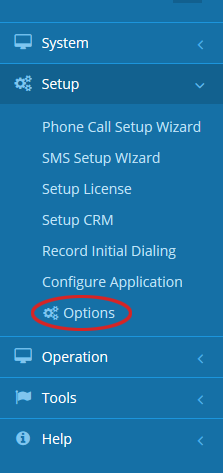
To start, open your Voicent App (vapps) and on the navigation bar on the left select Setup > Options
In the Options window click SIP.
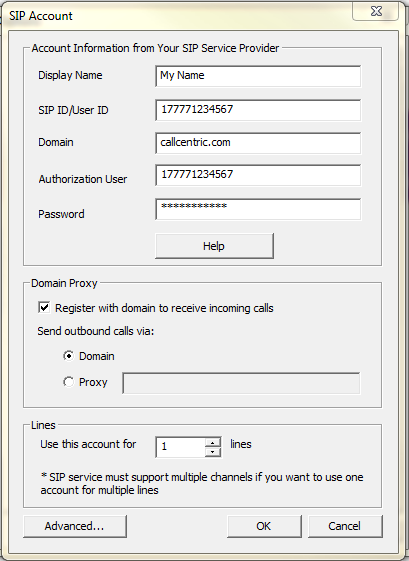
Click the Add button to specify your SIP account.
The following screen is an example using a CallCentric account.
If you have trouble setting up your VoIP service with Voicent, we can help. Email your account information to support@voicent.com. After we test it, we'll let you know the correct SIP settings and you can then change your account password accordingly.
Please note that Voicent software does not need extra software (like Xlite softphone) to make VoIP calls. Voicent software is configured as a softphone when used with a VoIP service.
You can also test your phone service with the Voicent App. From the Voicent App, select Operation on the side navigation bar and select Telephone Recording. Enter your telephone number and attempt to place a call.
Once received the call, make sure you say Hello so it detects a human instead of an answering machine. If you hear the audio from Voicent software's recording feature then everything is working perfectly.

