
IVR Studio: Inbound IVR
Setting up an automatic 24-hour information hotline is easy if the information is relative stable, for such your office hours. You can do that even with an answering machine. But if the information you provide is constantly changing, such as daily mortgage rates or latest NBA game scores, you need a flexible way to do that. The sample here shows an IVR system for 24 hour hotline where the information is fetched from a web page.
You can open this design by selecting Library > 24/7 Info Hotline from the program main menu.
The Call Flow
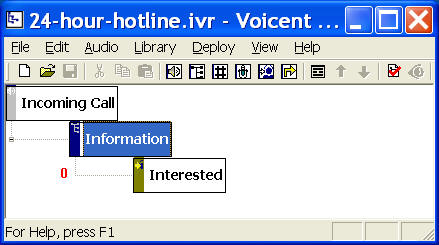
The call flow consists of one Choice Element and one Call Transfer Elements. The choice element (Information) provides the information. The Call transfer element have the call transferred. The transferred phone number can be any phone number, such as a cell phone or office receptionist's phone. It can be "transferred" using the same phone line with an alert window pop up on a computer.
When a caller calls the 24-hour information hotline, the system first fetches the information from a web page, then it automatically converts the text to voice using text-to-speech engine. The voice is played over the phone to the caller. At the end of the message, the caller can press 1 to have the call transferred.
Fetch Information from a webpage
You can extend Voicent IVR platform by integrating it with web sites or any other software products. There are two basic methods (actions): HTTP or Java. HTTP is the protocol for the Internet. It is best used for web site integration. Java is a general programming language. It can be used to extend Voicent IVR platform with virtually no limit. In this sample, we use the HTTP method.
To create an new action, open the property page (Right mouse click on an element, then choose Properties... from the popup menu.) for the Information element, select the Action tab, then click the New button. (For existing action, choose the Edit button).
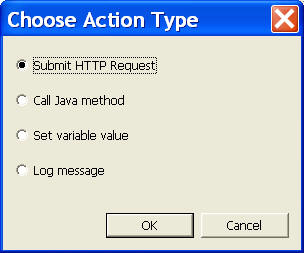
Select "Submit HTTP Request", and click OK. Fill in the following information:
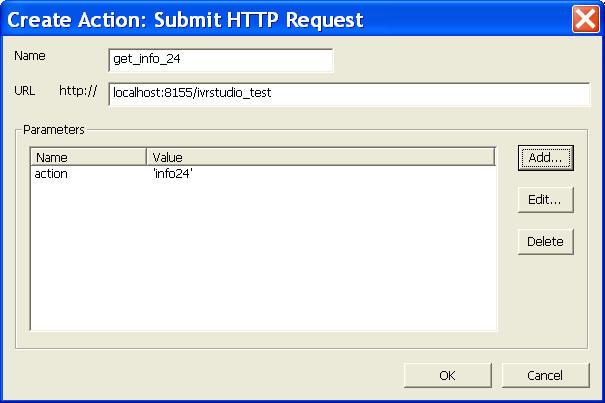
The HTTP action is basically an HTTP POST request sent to the specified URL. In this example, the URL is localhost:8155/ivrstudio_test, and one parameter action (with value equals to 'info24').
The return from the web page must be a list of name value pairs using the following format. Name should not contain space.
name1=value 1
name2=value 2
...
For example, one possible return for this sample might be:
lastUpdated = Sept. 1, 2007 12:00 PM
content = today's mortgage rate is 2% for 30 year fixes
The returned value can be access in the IVR Studio using the dot notation. For example, if the HTTP action is named get_info_24, the the content can be accessed as get_info_24.content. We can use the return value for the prompt.
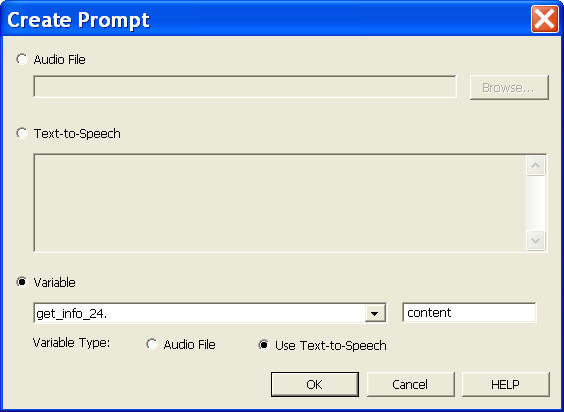
Select the Prompt tab from the element property sheet, click the New button. The dialog window is shown above. You can select action variable get_info_24, and set the parameter as content, and choose Use text-to-speech.
Use Actions And Prompts
The Information Element in the call flow has an HTTP action get_info_24 defined. Since all actions are executed first for an element, the get_info_24 action is executed before any prompt is played to a caller. For this action, an HTTP POST request is submitted to the URL defined in the get_info_24 action. The web site then returns two name value pairs, one named content, and the other named lastUpdated. (Here the URL: http://localhost:8155/ivrstudio_test is included in Voicent Gateway)
The Information Element also defined a prompt that uses the action variable. For example, the prompt defined in the above figure uses get_info_24.content. This makes the system to play the returned content over the phone using text-to-speech engine.
Deployment
You can use the sample application as is. To deploy the application, select Deploy > Submit to Gateway... from the program main menu. If the menu item is grayed out, select Validate... first.
If you have multiple IVR application deployed, please see IVR select application for more information.
Once deployed, restart the gateway to have the changes to take effect.
You can use the following URL to set the content.
http://localhost:8155/ivrstudio_test?action=setinfo24
When an incoming call is answered by the gateway, the application will execute the Information element, which first fetches the content from the web page, and then plays the returned content using text-to-speech engine.