
IVR Studio: Outbound IVR
Voicent BroadcastByPhone has a built-in Message Designer that is used for designing interactive outbound messages. But because it is limited to one level of interaction, it cannot be used for more flexible messages, such as a survey that requires multiple level of interactions. IVR Studio is fully integrated with Voicent BroadcastByPhone Autodialer and can be used to design messages with multiple level of interactions. This sample shows a multiple question survey that can be used by BroadcastByPhone Autodialer.
This sample is also captured in the following video demo:

The Call Flow
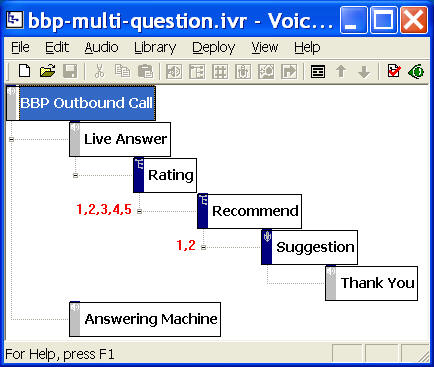
The call flow is straightforward for this sample. For outbound call, IVR studio automatically creates two elements, Live Answer and Answering Machine, under the top node. These two nodes represent two sub-designs, one for calls answered by live human, and the other for calls answered by answering machines or voicemail systems.
The Live Answer branch consists of two Choice Elements and a Recording Element. The first Choice Element lets the person called to rate the service, and the second Choice Element asks the person called if he would recommend the service to his friend, and the Recording Element asks the person called to record a voice message for his suggestions. The last element labeled Thank You is a simple prompt element.
You can open this design by selecting Library > Multiple Language from the program main menu.
Deployment
You can use the sample application as is. To deploy the application, select Deploy > Submit to Gateway... from the program main menu. If the menu item is grayed out, select Validate... first.
If you have multiple IVR application deployed, please see IVR select application for more information.
Once deployed, restart the gateway to have the changes to take effect.
Start Voicent BroadcastByPhone Autodialer, select Broadcast > Select Message from the program main menu. New confirmation columns that correspond to the touch tone key responses and voice recording are automatically added.
Start and use BroadcastByPhone as usual.