
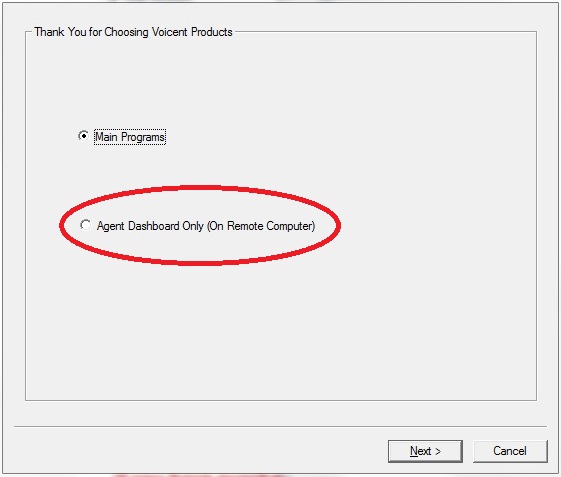
For the agent to work on a computer other than the dialing computer, you need to download Voicent software and install the RemoteAgent program on a remote machine (it can be in the same office as the dialing computer or anywhere there is an internet connection). To install the agent software, run the Voicent installer downloaded in the previous step, select Agent Dashboard, then click Continue. On the next screen, click the Install button to install RemoteAgent.
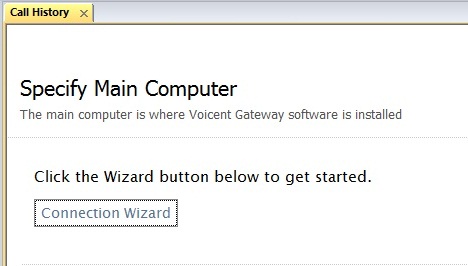
After you have installed the RemoteAgent software, run it and connect to the dialing computer. To connect to the dialing computer click "Connection Wizard." Follow the on-screen instructions to connect to the main installation of Voicent software.
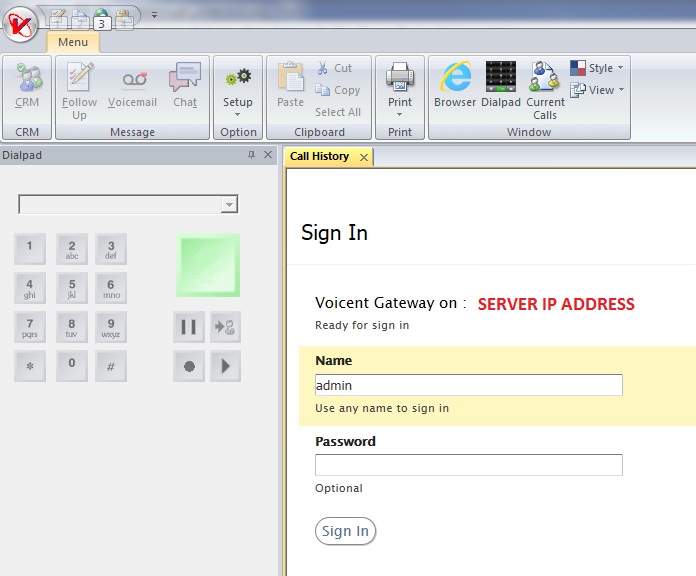
The Agent must login to the gateway server in order to receive screen popups. To login, simply type in any name and click the Login button on the RemoteAgent main window. Now if you start predictive dialing, the agent on this computer will receive screen popups. (NOTE: for CRM or PBX access you must use the default login -> [Username: admin] [Password: crm] or make a new login on the Voicent Application.)
To turn off the screen popup on the server computer, please select Voicent Gateway main menu > Setup > Options > Call Transfer, then check the box labeled "Do not show popup window on this computer".
To start predictive dialing, select Predictive from the program main menu, then select Start. When your phone rings, answer the call and say "hello". Now, the live-call-detected popup screen should appear on the agent's computer instead of the dialing computer.
