
Send An Email Confirmation with a Phone Call
If the caller successfully reserves an available room, the IVR application will send a confirmation email to the caller, confirming which room they have reserved.
Confirming Reservation
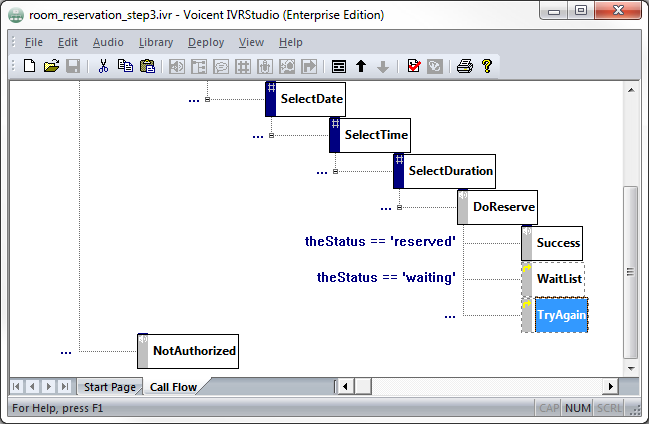
The DoReserve element will try to reserve the room. In the last step, we saved the status in the theStatus element. If theStatus='reserved', the room was successfully reserved. If theStatus='waitlisted', the caller will be notified if the room opens up. If theStatus is anything else, the room was not reserved. These should be the conditions to transition to the next three elements.
Sending the Email
In the element, will send out a confirmation email. Add a action. In the email, you can use variables, such as which will be replaced with the value when the email is sent.
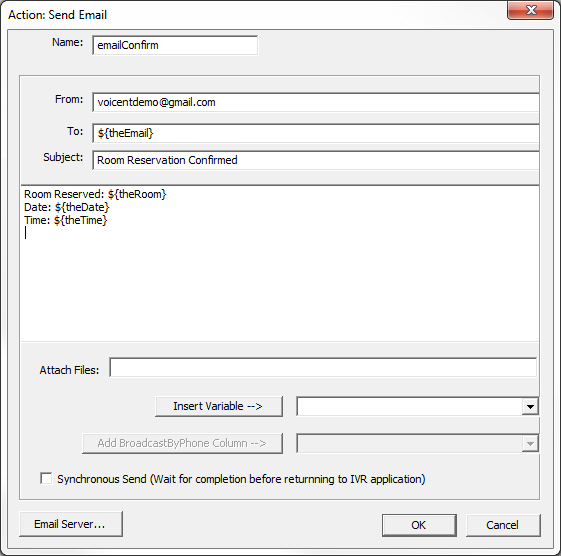
The email will look like:
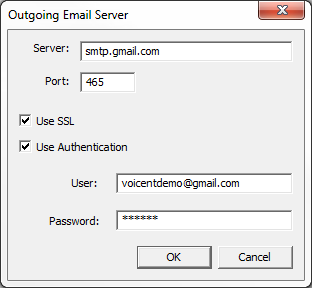
Make sure to specify the email server info. Click on the button at the bottom of the action window. Fill out the information for the email address you will use.
Application So Far
To see the IVR application up until here, open in the package provided at the beginning of this lesson.